

Wastewater Treatment Plant Data Acquisition, Local Dashboards, and Government Platform Reporting
During a shift handover, water quality instrument readings, pump and blower status in the PLC, and flow readings in the shift log often have to be checked separately. When it is time to submit data, staff also need to verify measurement point names, sampling times, and the format required by the receiving platform. The data already exists in the equipment, but there is no unified path for viewing it and delivering it to another system.
Consider an illustrative scenario at a typical wastewater treatment plant: a Woody industrial intelligent gateway reads equipment data that has been made accessible, displays it centrally in a local App on the gateway, and then formats and sends it according to government platform requirements. This is a general integration approach, not an account of an implemented customer project or a claim that it has passed acceptance testing for any particular regulatory platform.
Start by Connecting the Equipment Data
This example uses the WD2EC and its dual Ethernet ports, multiple serial ports, and 4G connectivity. A PLC supporting Modbus TCP connects through Ethernet2; online instruments supporting Modbus RTU connect to COM1 over RS485. The gateway reads variables using the address maps made available by the equipment. Acquisition intervals, data types, and communication parameters must be configured to suit the equipment requirements.
Candidate variables include flow, level, pH, chemical oxygen demand (COD), ammonia nitrogen, and the operating status of pumps and blowers. These are only candidate measurement points. The actual acquisition scope depends on the instruments installed on site, the data already collected by the PLC, and the access permissions available; it does not mean that all equipment can be connected directly. The gateway reads communication data. It does not measure water quality itself, and instrument analog signals are not connected directly to the gateway in this example.
After connection, standardize variable names, measurement point codes, units, timestamps, and validity status according to an agreed scheme. For example, when communication with an instrument is interrupted, retain its last update time and mark the data as invalid rather than continuing to present the previous reading as a live value. Where equipment time and gateway time are both involved, define the time source and synchronization method as well.
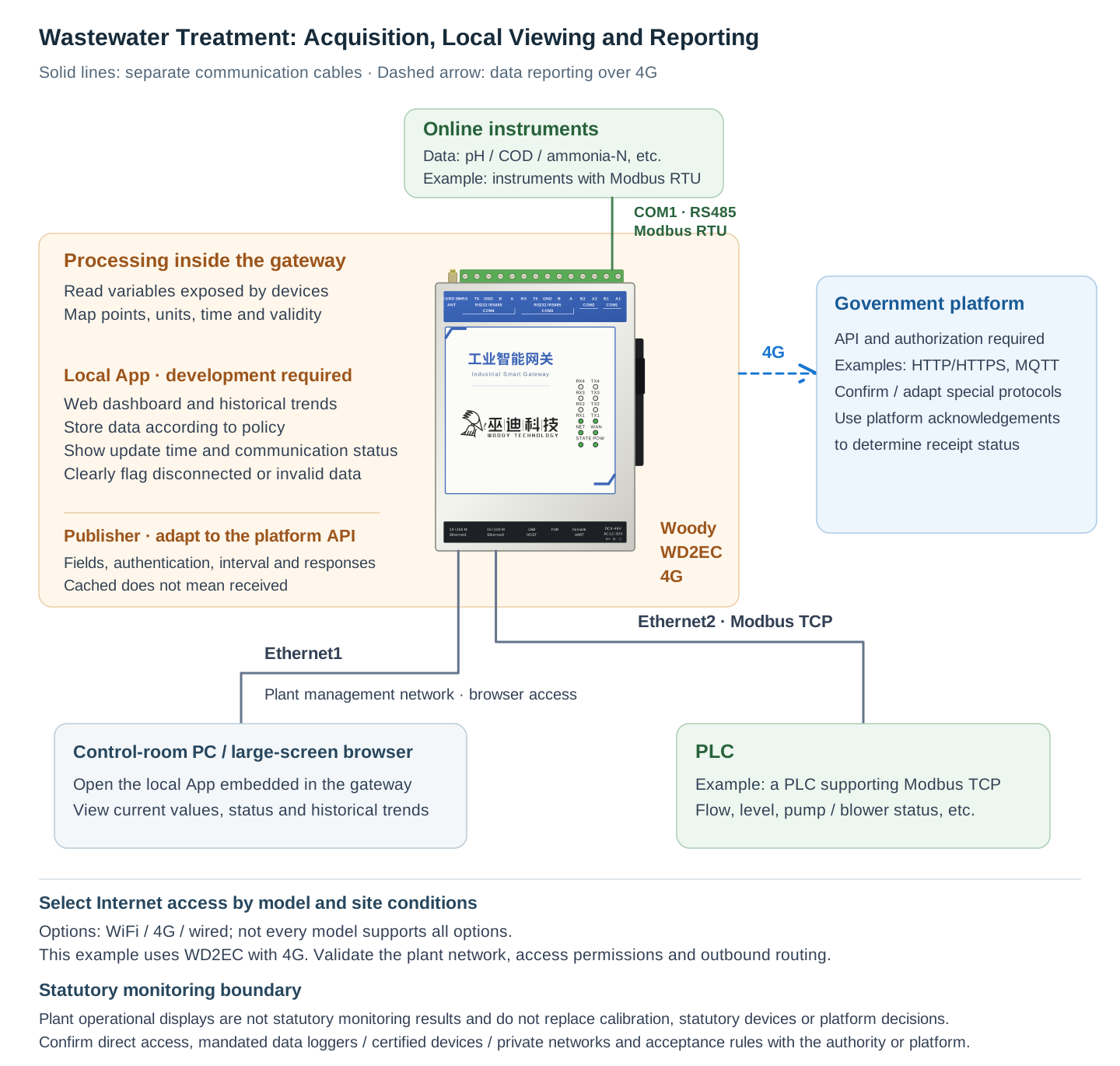
The diagram uses the WD2EC's 4G connection as an example of internet access. Ethernet1 connects to the plant management network so that the control room browser can access the gateway. Address planning and access permissions on the equipment and management sides, along with the 4G outbound route, must be verified against the site's network configuration. Automatic switching between wired and wireless connections is not assumed. At the solution level, WiFi, 4G, or wired access may be selected, provided the corresponding model supports it. If wired access is used instead to connect both the internet and the PLC, Ethernet1 connects to the internet side and Ethernet2 to the equipment side.
View Data Centrally in the Control Room Browser
Operators do not have to log in to an external cloud platform first. Over the plant management network, they can use a computer or large-screen browser to access the local App embedded in the gateway's Web management interface. The page can organize current values by process area while displaying update times and communication status. When operators need to understand how values have changed, they can consult historical trends saved according to the configured policy.
For example, treatment units, piping, flow measurements, and water quality measurement points can be arranged on one process mimic diagram. Equipment status and measurement point tables then help operators view data by area instead of working through a long list of variable names.
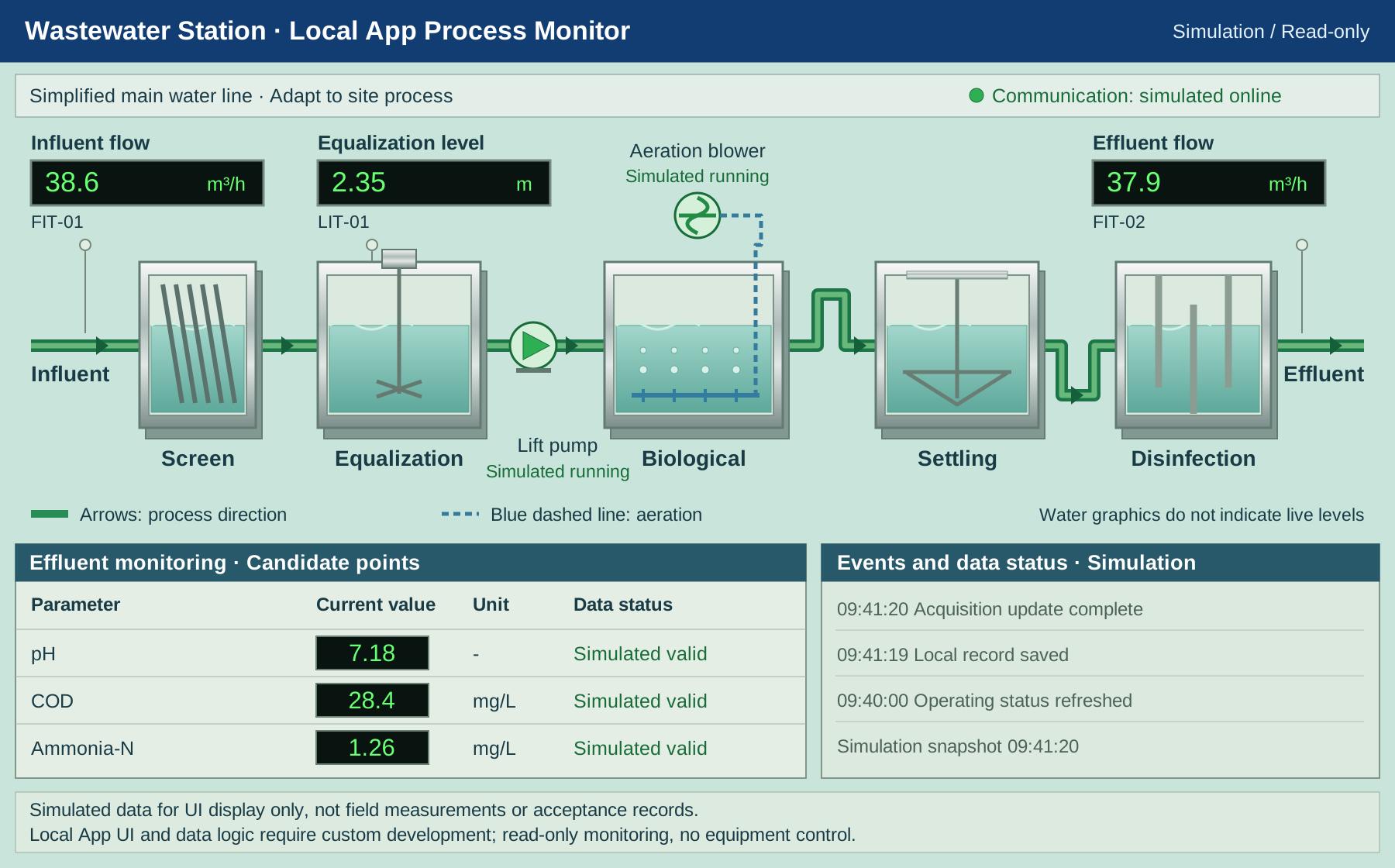
Local App process monitoring demo with simulated operating data. Readings, equipment states, and event times are simulated, not field measurements or acceptance records. The actual process and measurement points must be configured for the site. This illustration shows read-only monitoring and provides no equipment controls.
This wastewater treatment dashboard is not a preinstalled, ready-made application. The gateway provides a local App framework. Its pages are developed using JS/CSS/HTML, data processing and backend interfaces are written in Lua, and historical records can use the built-in SQLite database. Measurement point layouts, status presentation, recording frequency, historical queries, and user access scope all require configuration or development to meet project requirements.
With the information organized this way, shift handovers can use a single page to check what is being read now, when the data was updated, and which equipment has lost communication, rather than relying only on a set of apparently normal values. Historical retention periods, sampling or change-based recording policies, and backup methods should be determined according to the gateway's storage resources. Unlimited retention is not promised.
Format Reporting to Meet Government Platform Requirements
Local display and platform reporting serve two different purposes: the App supports on-site viewing and policy-based storage, while the publishing module formats the agreed data into messages required by the target platform. Both can use the same verified acquisition variables, but seeing data on a page does not mean that the platform has received it.
Before integration, obtain the platform's API documentation and access authorization. Clarify measurement point codes, timestamp formats and time zones, units and data definitions, validity status representation, authentication methods, reporting intervals, and the meaning of responses. The gateway supports publishing approaches such as HTTP/HTTPS and MQTT, and custom publishing logic can be written in Lua. The approach actually used and the message structure must still follow the target platform's requirements.
If the platform requires a dedicated protocol or a special onboarding process, feasibility must be confirmed separately, followed by adaptation and joint integration testing. This solution does not claim support for unconfirmed protocols such as HJ 212, nor does network connectivity confer eligibility to connect to a regulatory platform.
The publishing process should also record transmission failures, error responses, and any platform acknowledgments that are available. If the dashboard shows a "received" status, it must be based on the corresponding acknowledgment provided by the platform. A request having been sent, or data having entered a buffer, is not sufficient evidence of success.
Distinguish Acquisition Failures from Reporting Failures During Interruptions
When equipment communication fails or data is invalid, first flag the affected measurement points. Handle missing data and invalid status as agreed with the platform; do not fill in old values as normal live data. When internet or platform connectivity fails, record the reporting failure and use the gateway's offline buffering capability according to its configuration.
Buffer capacity, retention time, behavior when full, and retry policies must be determined during implementation. Once connectivity is restored, retries or backfill submissions may take place only as agreed and within the platform's permitted time window and deduplication rules. Not all platforms accept historical backfills. Buffered data is not the same as data received by the platform, and buffering does not justify a promise that data will never be lost. On-site viewing status and outbound reporting status should be presented separately so that operators can identify which part of the process has a problem.
What to Confirm Before Integration
- Equipment and measurement points: Verify PLC and instrument models, communication protocols, address maps, data types, units, and read permissions. Confirm that reliable data sources exist for the candidate indicators.
- Pages and records: Define the local App development scope, criteria for marking data invalid, time sources, access permissions, storage retention, and backup policies.
- Network and platform: Check the management-side and equipment-side networks, 4G coverage, and outbound routing. Obtain platform API documentation and authorization, and complete joint integration testing for fields, authentication, reporting intervals, responses, and backfill rules.
- Regulatory requirements: Confirm with the competent authority or platform operator whether direct gateway integration is permitted, whether designated data acquisition instruments, certified equipment, or a private network are mandatory, and which acceptance requirements apply.
Displaying plant operating data is not equivalent to providing statutory monitoring results. The gateway cannot replace water quality instrument calibration, legally required monitoring equipment, or determinations made by the government platform. This example covers only data reading, viewing, and reporting; it does not extend to remote control, automatic chemical dosing, or safety interlocks.
From Separate Readings to a Clear Data Path
For wastewater treatment plants with PLCs and online instruments that already support communication, this approach connects equipment data reading, local viewing, and platform reporting. Operators use a browser to check operating information centrally, while integrators adapt messages to clearly defined interfaces. The aim is not to add another isolated table, but to make the data source, update time, validity, and reporting outcome traceable, while preserving the respective responsibilities of the equipment, application, and regulatory platform.